


Monitor and remote for Nikon ZR

Be your own
crew.

SoloCrew turns your Android phone into a pro monitor and remote for the Nikon ZR. Frame, focus, expose and roll while you stand in front of the lens.

Free download PRO once for $14.99 Regular price $19.99 December 31, 2026 No subscription

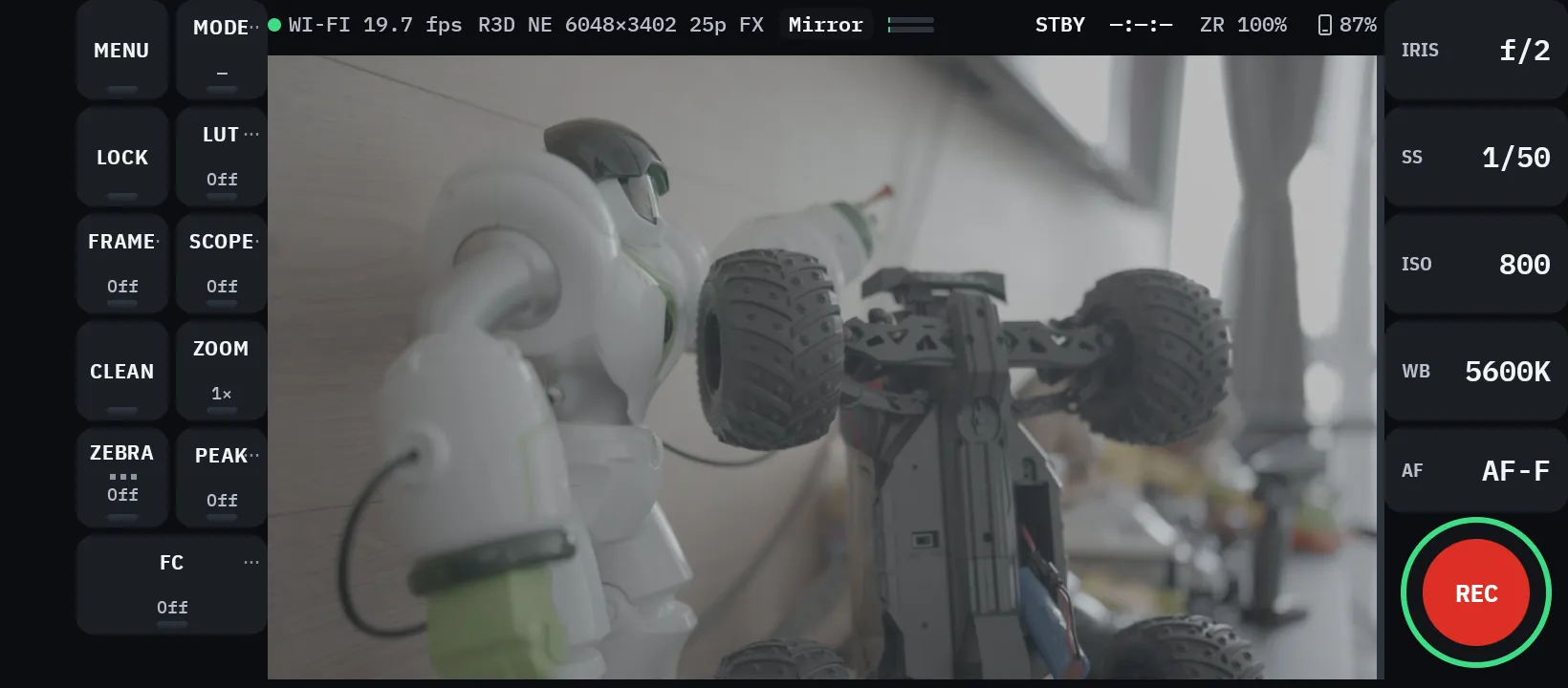
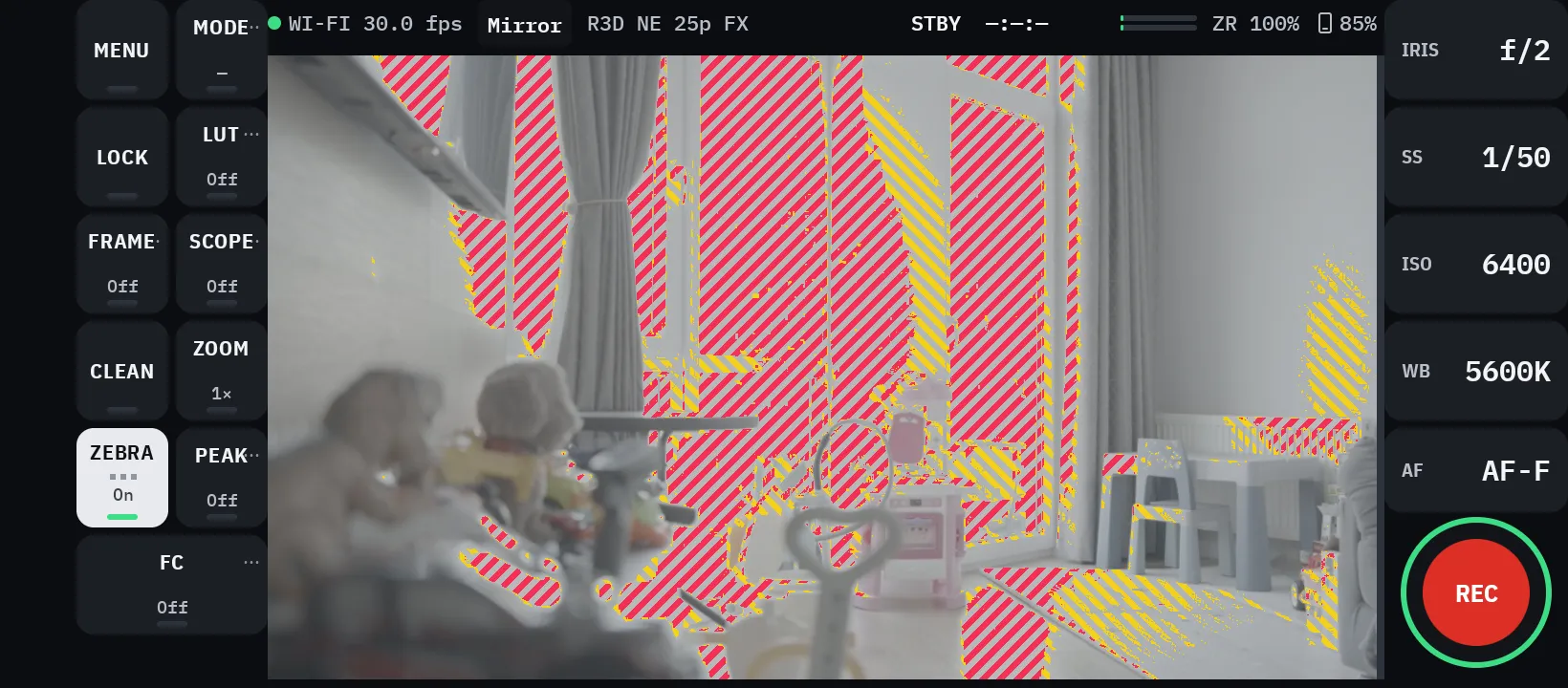
SoloCrew on a phone in landscape. Live view from a Nikon ZR with tool buttons on the left and iris, shutter, ISO, white balance and focus mode on the right.

ZR · LIVE · 1024×576
WI-FI OR USB-C · REC CONFIRMED BY CAMERA

Kostiantyn Yakymenko

Made by a creator who films alone, for everyone who shoots without a crew.

9.5M
followers
120M
views every month
8
years making videos
182
builds, each tested on real shoots
CREW The crew

Five crew jobs. One phone.

Shooting alone used to mean walking back to the camera after every take. Is it sharp? Is it exposed? Is it even rolling? SoloCrew answers from where you stand.

  • PEAK On
    ZOOM 2×
    AF AF-F

    Focus puller

    Peaking, 2× and 4× punch-in, and tap-to-focus. Know you are sharp before you roll.

  • FC On
    ZEBRA On
    WFM On

    DIT

    False color, zebras, waveform, parade, histogram and vectorscope, computed live from the camera feed.

  • IRIS f/2
    SS 1/50
    ISO 800
    WB 5600K

    Camera operator

    Iris, shutter, ISO, white balance and focus mode from the phone. Values locked on the camera stay readable.

  • WI-FI 25.6 fps ZR 100% 87%

    Camera assistant

    Watches the link, the camera battery, the phone battery and phone heat, and tells you before any of them costs you a take.

  • 9:16 90°
    Mirror On
    Clips On

    Video village

    A clean wireless picture of what the ZR sees, vertical or horizontal and mirrored when you face the lens. Play back the take right after you cut.

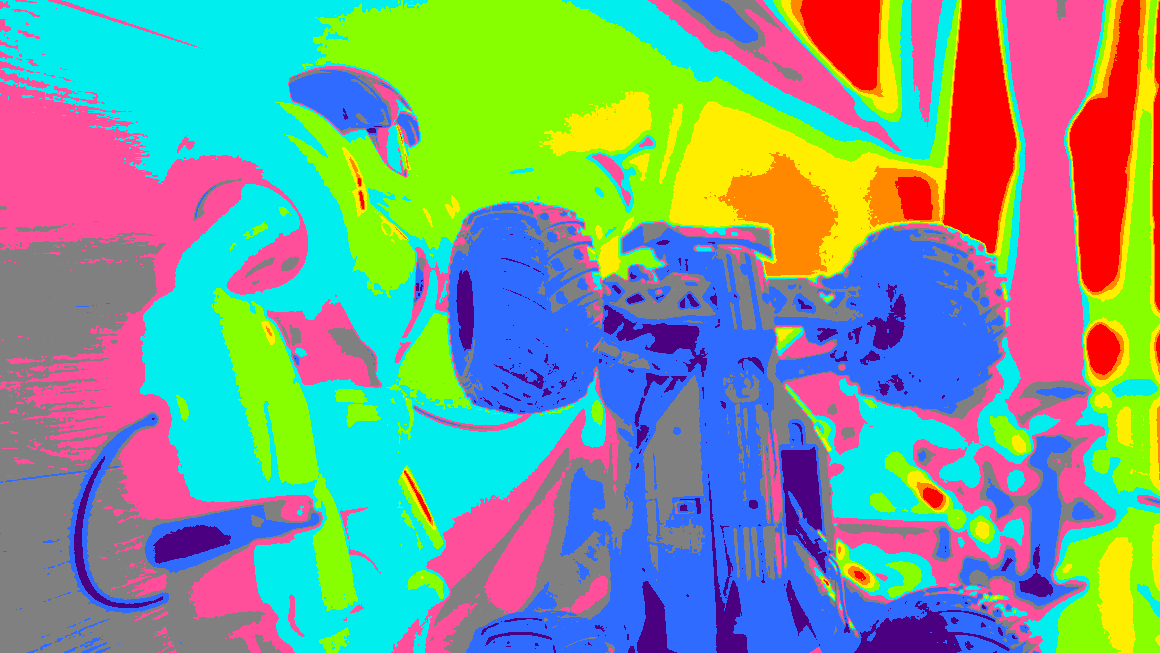
FC False color

False color you can trust to the stop.

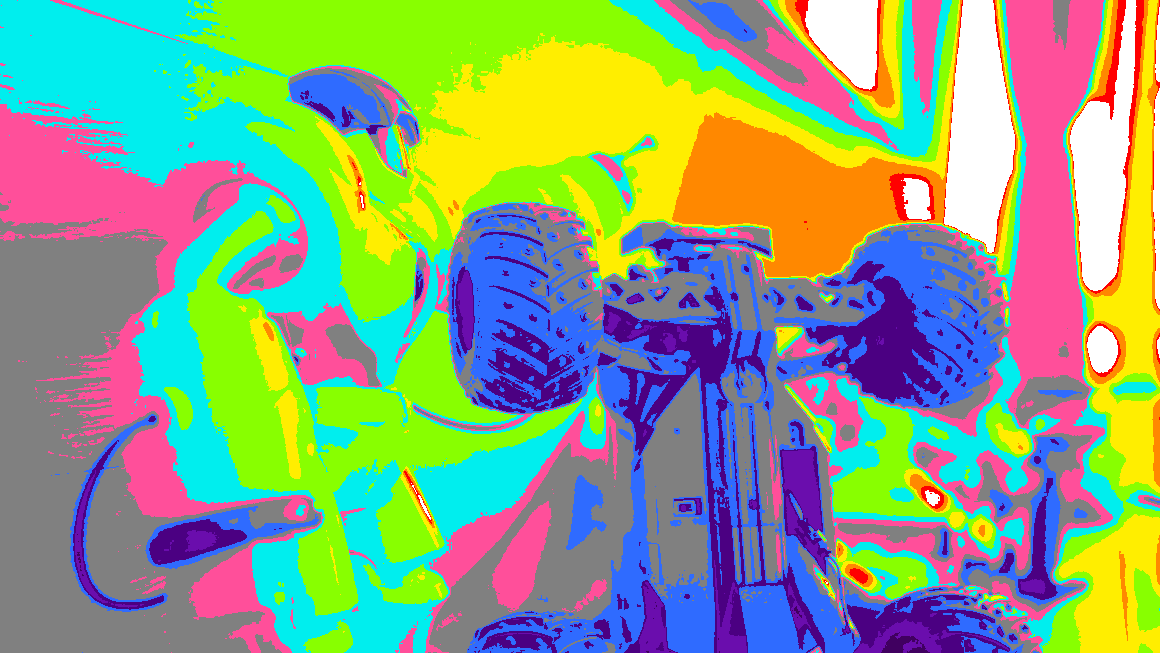
A false-color scale is only as good as its math. SoloCrew computes every zone from the ZR’s own log curve, so each color means exactly one stop of exposure.

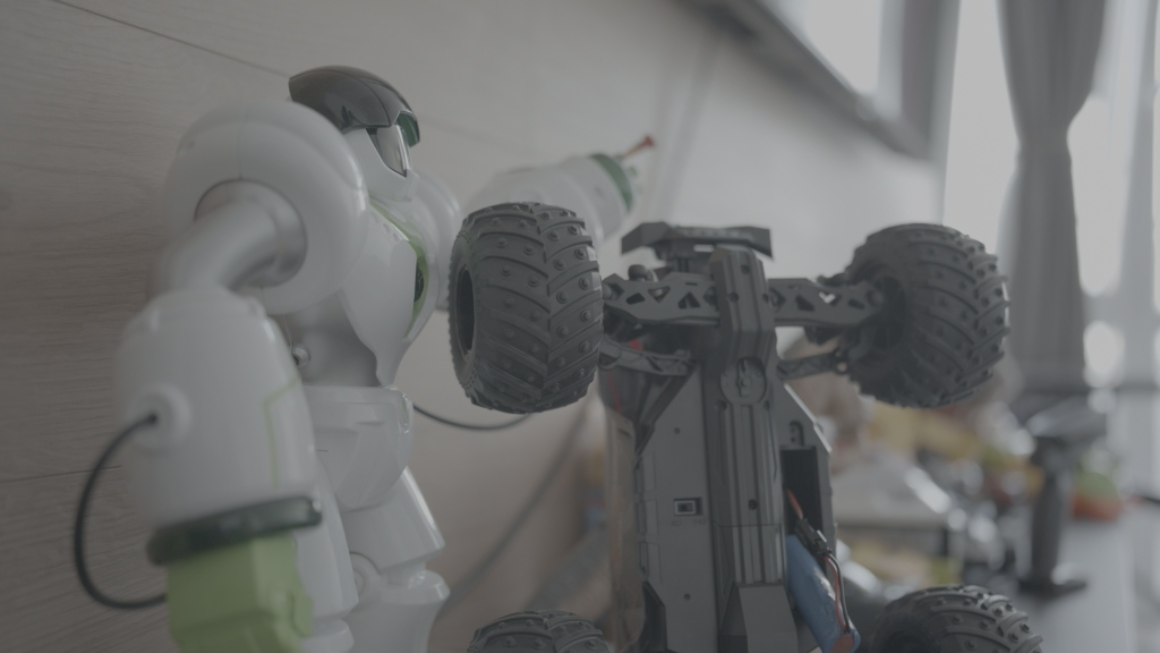
Live view · Log · LUT off · ISO 800/800

Original

Under the pointer

Point at the picture to read its zone.

Real Nikon ZR live view, log, LUT off. Zones are computed in your browser with the same math as the app.

Drag to compare Arrow keys move the divider.

Zones in stops from 18% grey

  • Lost all channels 4.1%
  • Recoverable one channel 0.7%
  • +5 4.2%
  • +4 9.7%
  • +3 16.5%
  • +2 15.5%
  • +1 skin 14.0%
  • 0 18% grey 18.1%
  • −1 10.2%
  • −2 5.6%
  • −3 1.3%
  • ≈ −4 0.1%
  • ≈ −5 below noise floor 0.0%
  • ≈ −6 below noise floor 0.0%
  1. 1

    Undo the log curve

    Each channel returns to linear scene light through the inverse Log3G10 curve. A 256-value table keeps it fast.

    lin = Log3G10⁻¹(code)

  2. 2

    Measure luminance in the camera’s gamut

    Luminance uses wide-gamut weights that match how the ZR records color.

    Y = 0.2867 R + 0.8430 G − 0.1297 B

  3. 3

    Count stops from 18% grey

    Every zone is one stop wide and centered on middle grey, from −6 to +5.

    zone = round( log₂( Y ÷ 0.18 ) )

  4. 4

    Split the highlights

    Red means one channel is clipping and detail can still come back. White means every channel is gone.

    max(R,G,B) ≥ A → recoverable · min(R,G,B) ≥ B → lost

  • 0.6 stop

    highlight error of a stretched generic scale

  • 1–2 stops

    shadow error of the same scale

  • 1 stop

    width of every SoloCrew zone

Errors computed for the scale SoloCrew replaced: a reference mapping of grey 105 and clip 250, stretched onto the ZR’s log codes.

Shadows are checked against the ZR’s measured noise floor. At ISO 800, a 1080p master reaches a signal-to-noise ratio of 4 at −4.8 EV.

False color and zebras are free.

Point at the picture to read its zone.

9:16 Orientation

Vertical or horizontal. Same take.

Shorts, Reels and TikTok want 9:16. YouTube wants 16:9. Preview the ZR either way while the camera records the full frame, so one take covers both.

Preview orientation

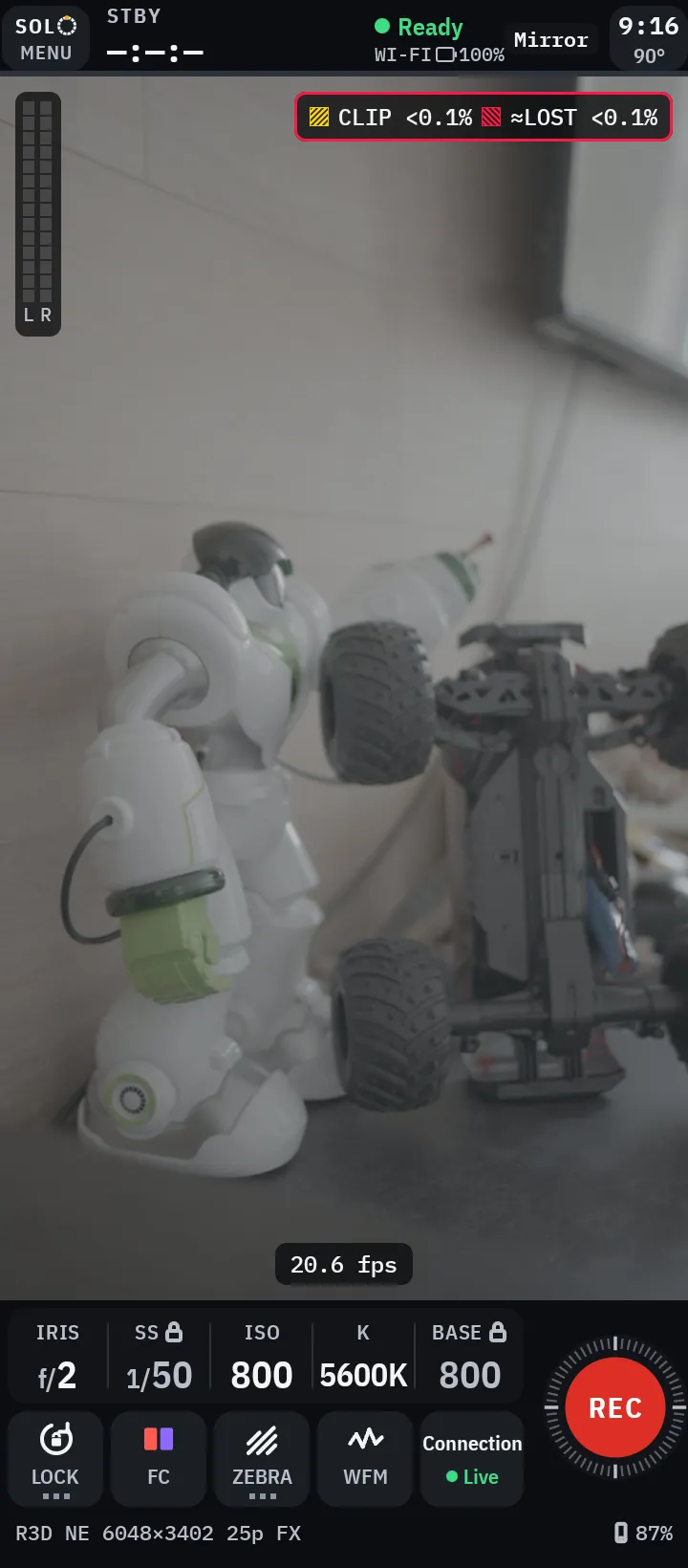
SoloCrew in portrait. Vertical live view from a Nikon ZR with iris, shutter, ISO, white balance and a REC button below the picture.

SoloCrew in portrait. Vertical live view from a Nikon ZR with iris, shutter, ISO, white balance and a REC button below the picture.
  • Rotate the preview

    Turn the picture 90° either way. The camera keeps recording the full frame.

  • Mirror view

    Flip the picture when you face the lens, so moving left looks like moving left.

  • Frame guides

    Aspect ratios, matte, safe areas and thirds show the crop you will deliver.

TOOLS Tools

Every tool an operator expects.

Exposure, focus, color and framing tools, computed live on your phone from the camera feed.

  • WFM , waveform with an 18% grey line
  • PARADE , RGB parade
  • HIST , histogram
  • VECTOR , vectorscope with a skin-tone line

Drawn from the same real ZR frame.

Exposure

  • False color

    Free

    One-stop zones from the ZR’s log curve, with a live legend.

  • Zebras

    Free

    Separate marks for recoverable and lost highlights.

  • Waveform

    Free

    Luma and brightest-channel traces together, with an 18% grey line.

  • RGB parade

    PRO

    Channel balance at a glance.

  • Histogram

    PRO

    Linear or log counts.

  • Vectorscope

    PRO

    Hue and saturation of the whole frame.

Focus

  • Focus peaking

    PRO

    Cyan, red or yellow, three sensitivities and a mono mode.

  • Punch-in

    PRO

    2× and 4× punch-in with a minimap of the visible area.

  • Tap to focus

    Free

    Move the focus point on the live picture. Cancel tracking in one tap.

Color and framing

  • LUTs

    PRO

    Built-in 709 preview, your own .cube files, a library of 20 and A/B compare.

  • Frame guides

    PRO

    Aspect ratios, matte, action and title safe, thirds and anamorphic desqueeze.

  • Monitor modes

    Free · PRO looks

    Switch looks in one tap. Expose and Clean are free. The Focus and Frame looks and three presets of your own are PRO.

Control, review and care

  • Camera control

    Free

    Iris, shutter, ISO, white balance and AF or MF.

  • Clip review

    Free · PRO saving

    Play takes from the camera card on your phone. Save and share them with PRO.

  • Link and batteries

    Free

    Link quality with real fps, camera battery and phone battery always on screen.

  • Heat guard

    Free

    Economy mode lowers the load when the phone runs warm on long shoots.

  • Problem report

    Free

    A text log of the link with no pictures and no passwords. It leaves the phone only if you send it.

LIVE On set

Straight from the camera.

Real screenshot from a Nikon ZR session. No mockup.
Kostiantyn Yakymenko holding the YouTube Gold Creator Award for passing 1,000,000 subscribers
FOUNDER SoloCrew

Kostiantyn Yakymenko

Founder of SoloCrew

9.5M followers 120M views every month 8 years making videos

STORY Story

Built by a creator who needed it.

“For years I filmed myself without a camera operator. Every take meant walking back to the camera to check focus, exposure and whether it was even recording. So I started building the crew I did not have, and I tested every version on my own shoots until nothing was missing.

  • Months of development
  • 182 builds
  • Every build tested with a real Nikon ZR on real shoots

Found on set. Fixed in the app.

On set In SoloCrew
On set Wi-Fi gaps froze the picture. In SoloCrew SoloCrew holds the frame and carries on.
On set The ZR dropped to low-resolution live view after every reconnect. In SoloCrew SoloCrew restores 1024×576 by itself.
On set Phones ran hot on long takes. In SoloCrew Economy mode lowers the load.
On set A stray tap could end a take. In SoloCrew Hold to stop.
On set Facing the lens felt backwards. In SoloCrew Mirror view.
CODE Engineering

Engineered with Claude Code.

SoloCrew is built by a solo founder working with Claude Code. Claude Opus 5.5 leads architecture, code review and on-device testing with a real Nikon ZR. That is how one person ships at the pace of a team.

release gate · 0.9.92 (182)

unit tests ....... 4,099 passed
failed ........... 0
skipped .......... 18
lint errors ...... 0
builds ........... hardware · operator · demo
  • 182 builds
  • 4,000+ automated tests before every release
  • 0 failing tests at the release gate
  • Camera protocol work from real device traces
  • Every image algorithm scored on real ZR frames
  • Each release checked on a phone with the camera
NEXT Roadmap

Where SoloCrew goes next.

  1. Now

    Available

    Nikon ZR on Android

    Available on Google Play.

  2. Now

    Available

    Clip review

    Play takes from the camera card on your phone.

  3. Planned

    More Nikon cameras

    Z9, Z8, Z6III and more of the Nikon Z line.

  4. Planned

    iPhone and iPad

    SoloCrew on iOS.

  5. Always

    Updates from real shoots

    New tools and fixes in every release.

PRO Pricing

Free is not a demo.

Download SoloCrew and shoot today. The self-healing link, stop-accurate false color, vertical and horizontal preview, full camera control and clip playback all work without paying. When you want the advanced tools, PRO is one small purchase. No subscription, no account, and it works offline.

Free

$0

A complete, working monitor

  • Live monitor, vertical and horizontal
  • REC with confirmed state
  • Iris, shutter, ISO, white balance, AF
  • False color and zebras
  • Waveform
  • All four ways to connect
  • Mirror view and preview rotation
  • Clip playback from the camera card

PRO

Launch price
$14.99 Regular price $19.99 December 31, 2026

One-time purchase. Yours to keep.

  • Everything in Free
  • Focus peaking, 2× and 4× punch-in
  • Focus and Frame monitor looks
  • LUTs with A/B compare
  • Frame guides and desqueeze
  • RGB parade, histogram, vectorscope
  • Full-size scopes
  • Three monitor presets
  • Save and share clips
  • Future PRO tools included

PRO tools work in the horizontal monitor.

Launch price until December 31, 2026. Regular price $19.99.

Try PRO free for 7 shooting days with your ZR.

A day counts after 5 minutes of live picture from the ZR. Start the trial in the app and use it within 60 days.

Get it on Google Play

Prices in US dollars. Purchases are handled by Google Play.

FAQ Questions

Questions

Which cameras does SoloCrew support?

The Nikon ZR today. Support for more Nikon Z cameras, including the Z9, Z8 and Z6III, is planned.

Which phones does it run on?

Android 10 or newer. A version for iPhone and iPad is planned.

What is free and what is PRO?

The free app is a complete monitor: live view in both orientations, the self-healing link, false color, zebras, waveform, the Expose and Clean looks, full camera control and clip playback. PRO adds focus peaking, 2× and 4× punch-in, the Focus and Frame monitor looks, LUTs, frame guides, RGB parade, histogram, vectorscope, full-size scopes, three presets and saving clips to your phone, for one payment. PRO tools work in the horizontal monitor.

Does it need the internet?

Not for shooting. SoloCrew talks to the camera directly over Wi-Fi or USB-C and nothing goes to the cloud. Only buying or restoring PRO goes through Google Play.

Does SoloCrew record video?

Your ZR records to its own card at full quality. SoloCrew shows the camera’s live view, controls the camera and plays back takes from the card.

Can I watch my takes on the phone?

Yes, for free. After you stop recording, open CLIPS to play takes from the camera card over the same connection. R3D and N-RAW clips play through their proxy, so turn on proxy recording in the camera. With PRO you can save clips to your phone and share them.

How smooth is the picture?

About 25–29 fps over Wi-Fi at 1024×576 with a strong signal, and up to 56 fps over USB-C with the camera at 120p. On weak Wi-Fi, SoloCrew can step down to 640×360 to keep the picture moving.

What if the connection drops while I am recording?

The camera keeps recording. SoloCrew shows Still recording, reconnects by itself and checks the camera’s real state before it lets you stop or start again.

Is SoloCrew made by Nikon?

No. SoloCrew is an independent app by Yakimenko Labs and is not affiliated with Nikon.

What data do you collect?

None. There is no account, no analytics and no ads. A problem report leaves your phone only if you choose to send it.

Be your own crew.

SoloCrew for Nikon ZR. Free on Google Play. PRO $14.99 until December 31.

SoloCrew in portrait. Vertical live view from a Nikon ZR with iris, shutter, ISO, white balance and a REC button below the picture.